# KushoAI Proxy Server
The KushoAI Proxy Server is a local Node.js application that enables seamless API testing when browser-based restrictions prevent direct API calls. This proxy serves as an alternative to the KushoAI Chrome extension, providing a robust solution for environments with strict security policies or when using non-Chromium browsers.
## Why Use the Proxy Server?
### CORS Restrictions and Browser Security
Modern web browsers implement Cross-Origin Resource Sharing (CORS) policies to prevent unauthorized cross-origin requests. When KushoAI attempts to make API calls directly from the browser, several security restrictions can block these requests:
#### Browser Origin Limitations
- **Immutable Origin Header**: Browsers automatically set the `Origin` header for all cross-origin requests and prevent JavaScript from overriding it.
- **Security Enforcement**: This browser-level security measure cannot be bypassed, ensuring that the origin of requests is always transparent to target servers.
- **CORS Policy Blocking**: If your target APIs don't include KushoAI's domain in their CORS policy, requests will be blocked by the browser.
#### Common Scenarios Requiring the Proxy
- **Corporate Networks**: Organizations with strict CORS policies that don't allowlist external domains.
- **Internal APIs**: Backend services configured only to accept requests from specific origins.
- **Development Environments**: Local APIs that restrict cross-origin access.
- **Non-Chromium Browsers**: Browsers where the KushoAI Chrome extension cannot be installed.
### How the Proxy Solves These Issues
The KushoAI Proxy Server operates as a local intermediary that:
1. **Removes Origin Restrictions**: Server-to-server requests don't include browser-imposed origin headers.
2. **Bypasses CORS Policies**: Acts as a same-origin proxy, eliminating cross-origin request restrictions.
3. **Maintains Request Integrity**: Preserves all request parameters, headers, and payloads while routing through the proxy.
4. **Enables Universal Testing**: Works with any API regardless of its CORS configuration.
## System Requirements
- **Node.js**: Version 20.0 or higher.
- **Operating System**: Windows, macOS, or Linux.
- **Network Access**: Ability to reach target APIs from your local machine.
## Installation Guide
### Step 1: Install Node.js (Recommended Method)
#### Using Node Version Manager (NVM)
**For macOS and Linux:**
```bash
curl -o- https://raw.githubusercontent.com/nvm-sh/nvm/v0.39.0/install.sh | bash
```
**For Windows:**
- Download and install [nvm-windows](https://github.com/coreybutler/nvm-windows) from the official GitHub repository.
- Follow the installation wizard to complete setup.
#### Activate NVM
```bash
# Restart your terminal or reload your shell configuration
source ~/.bashrc # or ~/.bash_profile depending on your shell
```
#### Install and Configure Node.js
```bash
# Install Node.js version 20
nvm install 20
# Set Node.js 20 as the active version
nvm use 20
# Verify successful installation
node --version # Should display v20.x.x
npm --version # Should display npm version
```
### Step 2: Set Up the Proxy Server
#### Clone the Repository
```bash
git clone https://github.com/kusho-co/kusho-proxy.git
cd kusho-proxy
```
#### Install Dependencies
```bash
npm install
```
#### Start the Proxy Server
```bash
node proxy.js
```
**Success Indicators:**
- The proxy server will display startup messages in your terminal.
- Default proxy runs on `http://localhost:3000/proxy` (unless configured otherwise).
- The server remains active and ready to handle requests from KushoAI.
### Command-Line Options
The proxy server supports several command-line arguments to customize its behavior:
#### Custom Port Configuration
By default, the proxy runs on port 3000. You can specify a different port by passing it as an argument:
```bash
# Run on port 8080
node proxy.js 8080
# Run on port 5000
node proxy.js 5000
```
#### Verbose Logging
Enable detailed logging to see request payloads and response data for debugging purposes:
```bash
# Enable verbose mode with -v flag
node proxy.js -v
# Enable verbose mode with --verbose flag
node proxy.js --verbose
```
**Verbose mode displays:**
- Complete request payload including URL, method, headers, and body
- Full response data from target APIs
#### Combining Options
You can combine port and verbose options in any order:
```bash
# Run on port 8080 with verbose logging
node proxy.js 8080 -v
# Same as above (order doesn't matter)
node proxy.js -v 8080
```
## Configuration
### Connecting KushoAI to the Proxy
Once your proxy server is running, configure KushoAI to route API calls through the local proxy:
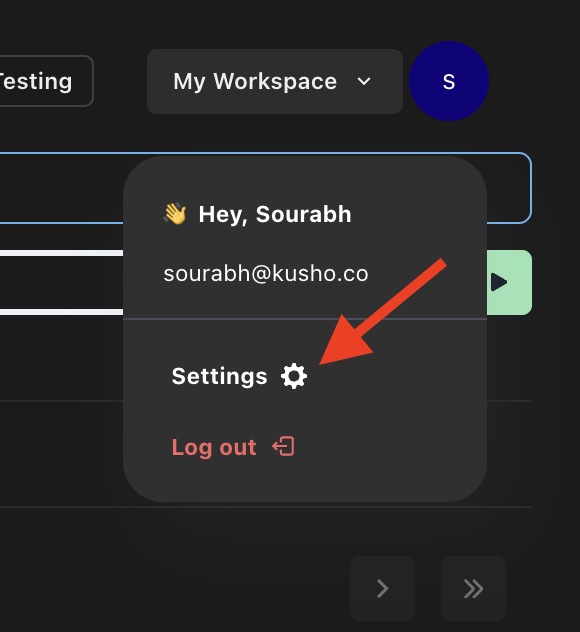
#### Step 1: Access Settings
Navigate to **Settings** from the top-right menu in the KushoAI interface.
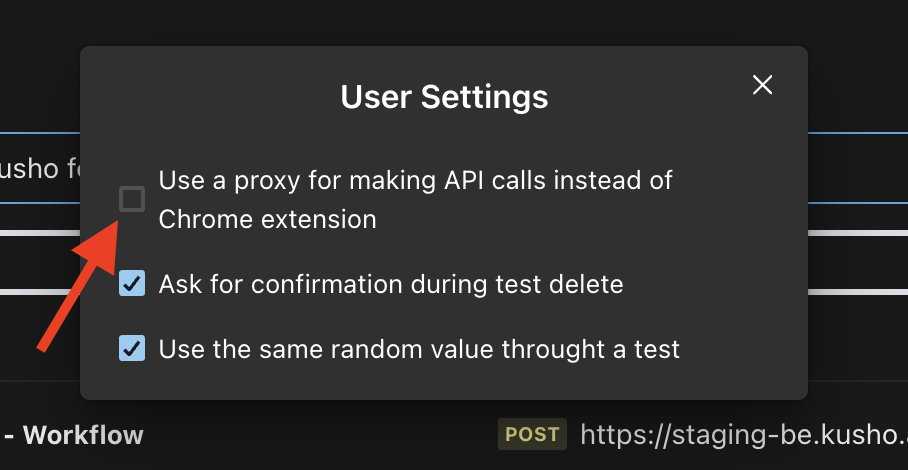
#### Step 2: Enable Proxy Mode
Toggle the **Enable Proxy** option to route API calls through your local proxy server instead of using the Chrome extension.
#### Step 3: Configure Proxy URL (Optional)
If you're running the proxy on a different port or hostname, update the proxy URL accordingly.
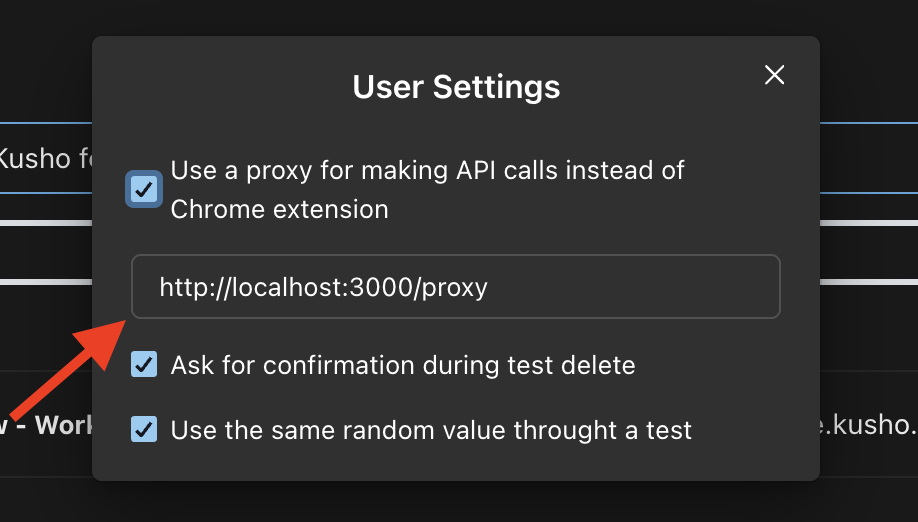
**Default Configuration:**
- **Host**: `localhost`
- **Port**: `3000`
- **Protocol**: `http`
- **Full URL**: `http://localhost:3000/proxy`
## Usage and Testing
### Verifying Proxy Functionality
1. **Start the Proxy**: Ensure `node proxy.js` is running without errors.
2. **Configure KushoAI**: Enable proxy mode in KushoAI settings.
3. **Execute Tests**: Run your API tests through KushoAI - requests should now flow through the proxy.
4. **Monitor Logs**: Check the proxy server terminal for request logging and any error messages.
### Troubleshooting Common Issues
#### Proxy Server Won't Start
- **Port Conflict**: Another service may be using port 3000.
- **Node.js Version**: Ensure you're running Node.js 20 or higher.
- **Dependencies**: Run `npm install` to ensure all dependencies are installed.
#### API Calls Still Blocked
- **Proxy Configuration**: Verify the proxy URL in KushoAI matches your running proxy server.
- **Network Connectivity**: Ensure your local machine can reach the target APIs.
- **Firewall Settings**: Check if local firewall rules are blocking the proxy.
#### Performance Considerations
- **Local Processing**: All requests are processed locally, eliminating external network latency for the proxy step.
- **Memory Usage**: The proxy server has a minimal memory footprint for typical API testing workloads.
- **Concurrent Requests**: Supports multiple simultaneous API calls without performance degradation.
## Security Notes
- **Local Operation**: The proxy server operates entirely on your local machine.
- **No Data Storage**: Requests and responses are not logged or stored persistently.
- **Direct Routing**: Acts as a pass-through proxy without modifying request content.
- **Network Isolation**: Only accessible from your local machine by default.
The KushoAI Proxy Server provides a reliable, secure solution for API testing in environments where browser-based restrictions would otherwise prevent comprehensive testing workflows.