
Report Structure
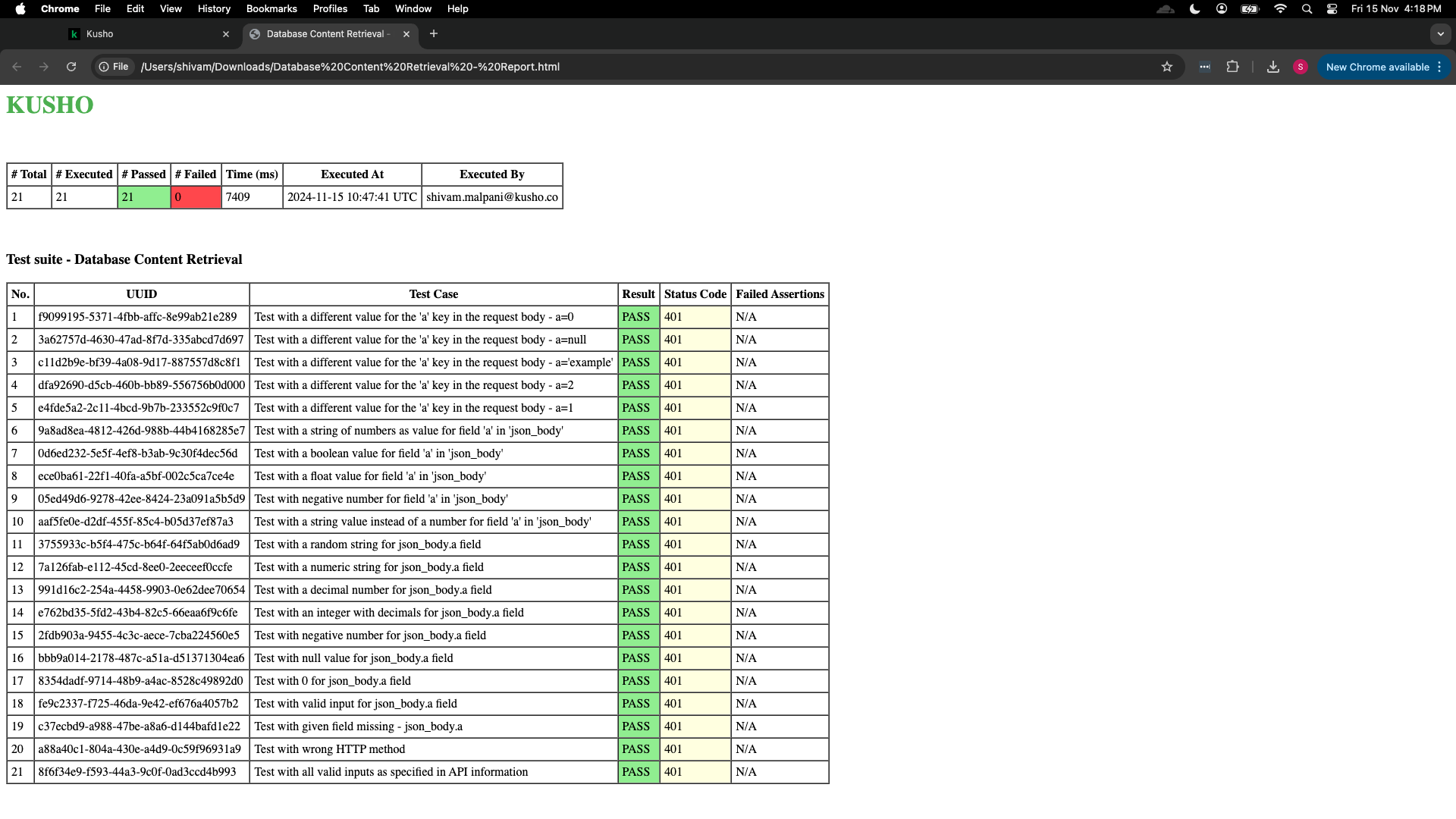
Overview
The Kusho test report follows a structured format designed to provide clear visibility into API test execution results. This document outlines the key components and organization of the test reports.
Report Components
1. Header Summary
The report begins with a summary table containing the following metrics:
2. Test Suite Information
Following the header, the report displays the test suite name and purpose, e.g., "Test suite - Database Content Retrieval".
3. Detailed Test Results Table
The main body of the report consists of a detailed table with the following columns:
Result Indicators
Status Codes
- Common HTTP status codes:
- 401: Unauthorized.
- 200: Success.
- 404: Not Found.
- 500: Server Error.
Visual Indicators
- PASS results are highlighted in green.
- Failed tests (if any) are highlighted differently.
- N/A in the Failed Assertions column indicates a successful test.
Best Practices
Report Generation
- Generate reports after each test suite execution.
- Include a timestamp and test suite name in the report filename.
- Store reports in a designated directory structure.
Report Analysis
- Review the summary metrics first.
- Investigate any failed tests immediately.
- Document unusual patterns or recurring issues.
- Track execution times for performance monitoring.